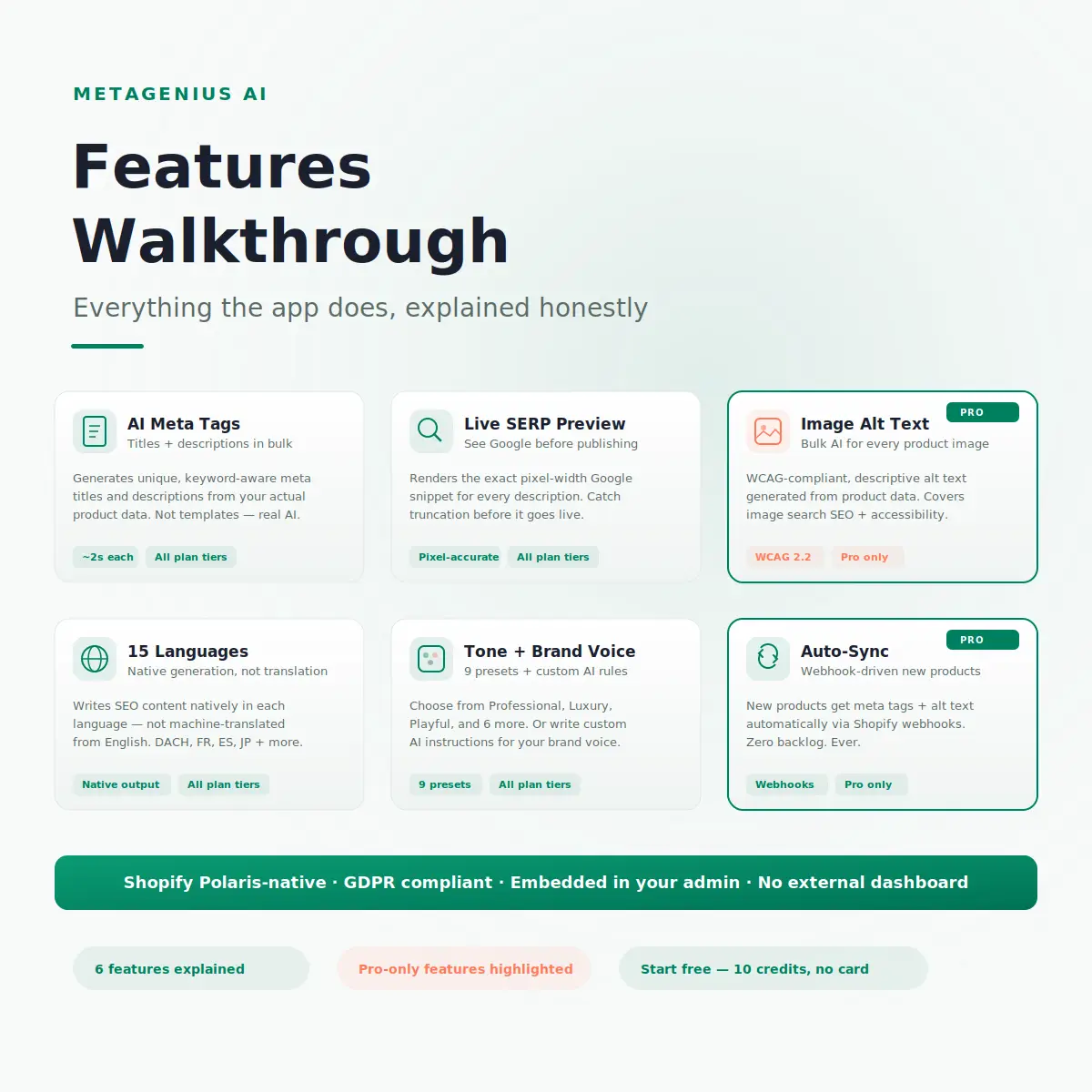
The MetaGenius AI listing on the Shopify App Store gives you the feature bullet points. This post gives you the context: what each feature actually does inside your Shopify admin, why it matters for SEO, and which features justify upgrading from Free to Starter or Pro.
Quick disclosure: we built MetaGenius AI. We're obviously not neutral. But we're also going to name the things this app doesn't do and the situations where a different tool is the better choice. Here's the honest walkthrough.
Feature 2: Live Google SERP Preview
Available on: Free, Starter, Pro
Every meta title and description you generate or edit gets a real-time Google SERP preview. This isn't a character counter — it's a pixel-width renderer that shows exactly how your snippet will appear in Google search results, including truncation indicators.
Why this matters
Google doesn't truncate at a fixed character count. It truncates at a pixel width — roughly 920px on desktop, 680px on mobile. An "M" takes more pixels than an "i." A meta description that's 150 characters with wide letters gets truncated, while a 160-character description with narrow letters might display in full. The SERP preview catches this before your description goes live — eliminating the guessing that causes Google to rewrite your meta descriptions.
Without a preview, you're publishing blind. With it, you ship with confidence. This feature alone prevents the most common reason Google replaces your description with an auto-generated one.
Feature 3: AI Image Alt Text (Pro Only)
Available on: Pro only
This is the feature that most often drives the upgrade from Starter to Pro. MetaGenius AI generates descriptive, WCAG-compliant alt text for every product image in your catalog — in bulk.
The two problems it solves
SEO: Google Images drives 22.6% of all search queries. Product images without alt text don't appear in those results. For visual categories (fashion, jewelry, home décor), image search traffic can match or exceed standard organic traffic. Every product image without alt text is invisible to that entire channel.
Accessibility: WCAG 2.2 Success Criterion 1.1.1 requires text alternatives for every non-decorative image. The European Accessibility Act is now enforceable — fines up to €500,000. This isn't optional. The WebAIM Million 2026 study found missing alt text is the #2 most common web accessibility failure.
How it works
Navigate to the Image Alt Text tab. Select products. Click Generate. The AI writes a unique description for each image based on the product's content and metadata. Each alt text appears next to its image thumbnail for review before saving. For the full setup guide, see our Shopify alt text generator walkthrough.
Feature 4: 15-Language Native Generation
Available on: Free, Starter, Pro
MetaGenius AI generates meta tags natively in 15 languages — not machine-translated from English. This is a critical distinction. As Aleyda Solis has noted in her international SEO work, translated meta tags often miss the natural phrasing that native speakers use in search queries. A German merchant searching "Ledertasche kaufen" won't click a snippet that reads like Google Translate output.
Supported languages include English, German, French, Spanish, Italian, Portuguese, Dutch, Swedish, Danish, Norwegian, Finnish, Japanese, Korean, Chinese (Simplified), and Arabic. For stores using Shopify Markets or multi-region setups, this feature lets you generate localized meta tags without hiring translators.
The 15-language feature is available on all plans — including Free. You can test the output quality in your target language using the 10 free credits before upgrading.
Feature 5: Tone Presets + Custom AI Instructions
Available on: Free, Starter, Pro
MetaGenius AI ships with 9 built-in tone presets: Professional, Luxury, Playful, Informative, Persuasive, Minimalist, Bold, Technical, and Friendly. Each preset adjusts the AI's writing style — a "Luxury" preset produces different phrasing than "Playful" for the same product.
Custom AI instructions
Beyond presets, you can write free-form instructions that the AI follows during generation. Examples:
- "Always mention the material and country of origin in the first sentence."
- "Never use exclamation marks. Keep the tone understated."
- "Include 'free returns' in every product meta description."
- "Use British English spelling for all output."
Custom instructions are the bridge between generic AI output and your brand voice. They're not perfect — you'll still want to review the output — but they get the AI 90% of the way to sounding like your brand. The remaining 10% is a quick manual pass on your highest-traffic pages.
Feature 6: Auto-Sync for New Products (Pro Only)
Available on: Pro only
This feature uses Shopify webhooks to detect when you create a new product. The moment a product is added to your store, MetaGenius AI automatically generates its meta title, meta description, and image alt text — before the product page even goes live.
Why auto-sync matters
The most common pattern in Shopify SEO: a merchant does a big bulk SEO push, fixes everything, and then slowly accumulates new products with blank meta tags over the next 6 months. By the time they notice, 100 new products have empty SEO fields. Auto-sync eliminates this backlog permanently.
For stores that add products frequently — dropshippers importing from suppliers, fashion brands with seasonal launches, stores using print-on-demand — this is the difference between perpetually falling behind and staying fully optimized without thinking about it.
See every feature in action. 7-day Pro trial, no commitment.
Install MetaGenius AI, start the Pro trial, and test all 6 features on your actual products. Generate meta tags, preview in Google SERP, bulk-tag alt text, and turn on auto-sync. Cancel before day 7 if it doesn't deliver.
Start Your Free Pro Trial →What MetaGenius AI Doesn't Do (Honest Limits)
We'd rather you know upfront than find out after installing:
- Blog content writing: MetaGenius generates meta tags for blog posts, but it doesn't write the blog posts themselves. Blog content needs original expertise and insight — exactly the kind of work Google's Helpful Content guidance rewards.
- Product description rewriting: The app optimizes meta tags and alt text, not product descriptions. If your product descriptions are weak, a meta tag improvement won't fix the underlying content problem.
- Technical SEO: MetaGenius doesn't handle canonical tags, robots.txt, Core Web Vitals, sitemap configuration, or page speed. For technical auditing, pair it with a dedicated tool like Ahrefs or Screaming Frog.
- Link building: No app builds backlinks for you. Links come from content marketing, PR, and partnerships.
- Schema markup: The app doesn't generate structured data (JSON-LD). Yoast or a dedicated schema plugin handles that.
MetaGenius AI does one thing well: AI-powered meta tags and alt text for Shopify, in bulk, with quality control built in. It's not an "all-in-one SEO suite" — and that's by design. For a broader view of what other AI SEO tools cover, see our 2026 comparison. For a complete Shopify SEO guide covering every optimization area, start there.
Frequently Asked Questions
{{ page_description }} Liquid tag (which is virtually all of them) will display the meta tags MetaGenius generates.See every feature on your actual products. Free.
Install MetaGenius AI on Shopify and start the 7-day Pro trial. Generate meta tags, preview in Google SERP, bulk-tag image alt text, and enable auto-sync. Pay nothing until you're sure it delivers.
Start Your Free Pro Trial →