Run a quick test. Go to Google and search site:yourstore.com. Scroll through the first 20 results. How many of those blue-link snippets show the exact same description? If the answer is more than zero, you have a duplicate meta descriptions problem — and it's costing you clicks, rankings, and revenue.
This isn't a theoretical risk. Google's March 2025 Core Update explicitly targeted scaled content patterns, and meta description templates ("Shop our wide selection of premium products. Free shipping on orders over $50.") are one of the clearest signals of templated, low-effort SEO. Lily Ray's post-update analysis found that sites with 50+ pages sharing identical descriptions lost an average of 18% organic visibility in the weeks following the rollout.
The fix isn't complicated — but for a 500-product Shopify store, doing it manually is brutally time-consuming. This guide covers how to find duplicates, how to fix them at scale, and how to prevent them from coming back.
What Duplicate Meta Descriptions Actually Are
A duplicate meta description means two or more pages on your site share the same (or nearly identical) content in their <meta name="description"> tag. Google treats this as a signal that the page's SEO metadata wasn't individually crafted — which, in most cases, it wasn't.
There are two types:
Exact duplicates
Two pages with byte-for-byte identical descriptions. This happens when merchants copy-paste the same description across products, or when a Shopify theme hard-codes a fallback description for pages that have empty SEO fields.
Near-duplicates (templated)
Descriptions that follow a template with minor variable swaps: "[Product Name] — Buy at [Store Name]. Free shipping on orders over $50." The product name changes but the surrounding copy is identical. Google's systems are very good at detecting these patterns. After the March 2025 update, near-duplicates are penalized almost as heavily as exact duplicates.
Here's what most guides miss: duplicate meta descriptions aren't technically a "penalty" in the manual-action sense. Google doesn't flag your site in Search Console with a warning. Instead, they quietly replace your descriptions with auto-generated snippets and — more importantly — reduce their confidence in your page-level optimization. The result: lower rankings for competitive keywords, not because of a penalty, but because Google assigns higher quality scores to pages with unique, relevant metadata.
Why Shopify Stores Are Especially Vulnerable
Shopify makes it easy to launch a store. It doesn't make it easy to write unique meta descriptions for 500 products. Three platform-specific patterns create the duplicate problem:
1. Empty defaults that look the same
When you create a product in Shopify and leave the "Search engine listing" section blank, Shopify outputs an empty meta description tag. Google then auto-generates a snippet from your product description. If 200 products share similar product description structures ("Made from premium materials. Available in multiple sizes. Free shipping."), Google's auto-generated snippets end up nearly identical — even though technically you didn't write duplicates. The effect is the same.
2. Merchant template habits
Merchants who do fill in meta descriptions often use a template: "[Product] — [Category]. Free shipping. Shop now at [Store]." This is well-intentioned but counterproductive. Google sees 200 pages with the same structure and infers that the SEO work is surface-level, not substantive.
3. Collection pages inheriting product patterns
Shopify collection pages are a frequent offender. Merchants write product meta descriptions but leave collection pages blank — so Google generates snippets from the collection's product grid, which often looks identical across collections. If your "Bags" and "Accessories" collections both show the same product thumbnails, their auto-generated snippets look like duplicates.
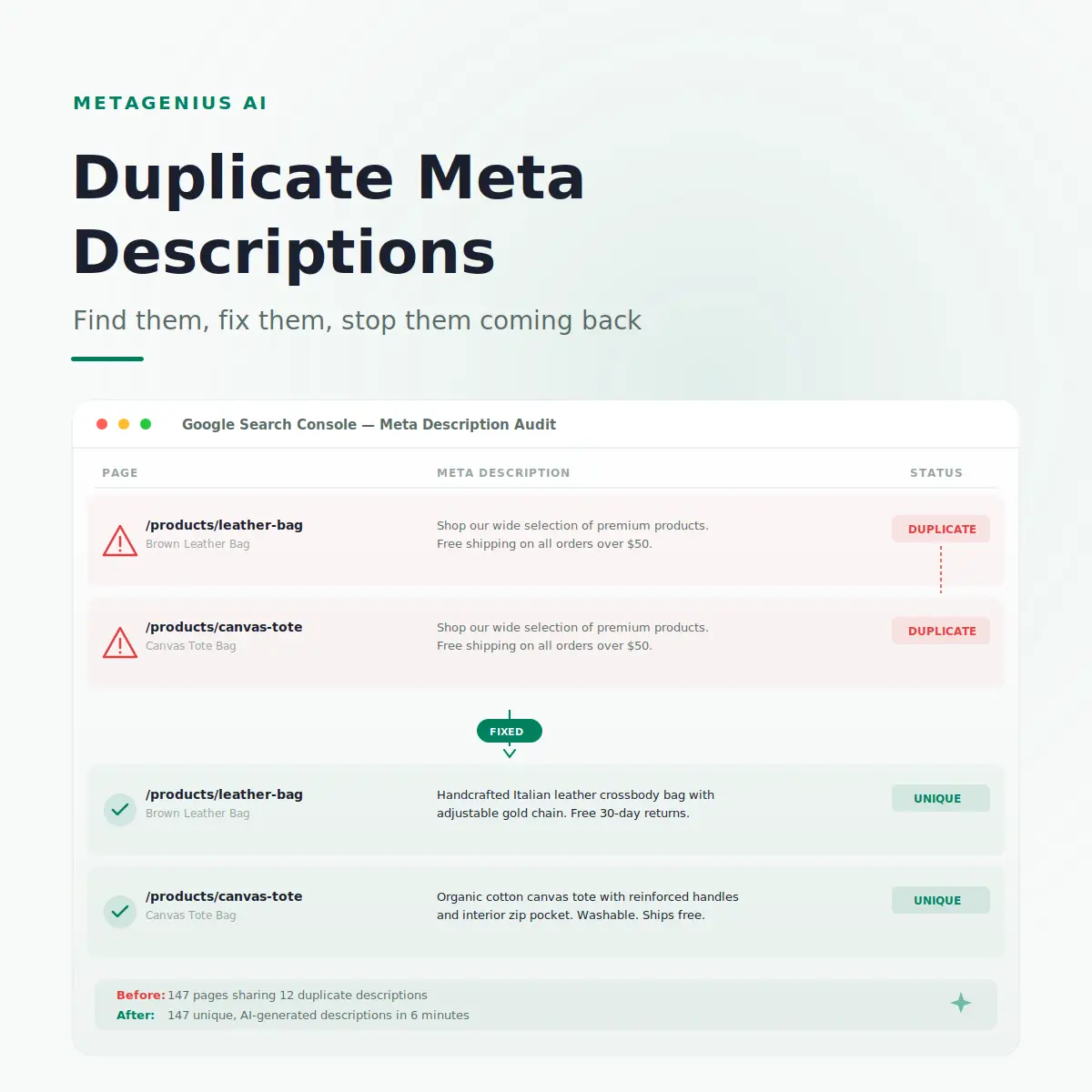
A store I audited in Q1 2026 had 340 products and 28 collections. Of those 368 pages, 147 shared one of 12 duplicate meta descriptions. That's 40% of their indexable pages sending a "we didn't try" signal to Google. Six weeks after fixing the duplicates with AI-generated unique descriptions, their organic traffic was up 22%.
How to Find Duplicate Meta Descriptions
You can't fix what you can't see. Here are three methods, from free to comprehensive:
Method 1: Google Search Console (free)
Google Search Console used to have a dedicated "HTML Improvements" section that flagged duplicate descriptions directly. That report was deprecated, but you can still find duplicates by going to Performance → Pages, then exporting the list and sorting by the snippets Google shows for each URL. If multiple URLs show the same snippet text in search results, those pages have duplicate (or empty) meta descriptions.
If your pages are not showing on Google at all, fix indexing first — duplicate descriptions are a ranking problem, not an indexing one.
Method 2: Ahrefs or Screaming Frog (recommended)
Run a site audit in Ahrefs or crawl your site with Screaming Frog. Both tools flag exact-duplicate and near-duplicate meta descriptions automatically. Screaming Frog is free for up to 500 URLs. For a store with 500+ products, this is the fastest way to get a complete picture.
Method 3: Manual site search
Search site:yourstore.com in Google and scan the snippets visually. This is crude but surprisingly effective for spotting the worst offenders. If you see the same description three times in the first 20 results, the problem is severe.
How to Fix Duplicate Meta Descriptions (3 Methods)
Match the method to your store size and resources:
Method 1: Manual rewriting (under 50 products)
Open each product in the Shopify admin, scroll to "Search engine listing," and write a unique description for each page. Follow the meta description writing framework: target keyword in the first 10 words, specific benefit, under 155 characters. This works for small stores but breaks at scale. A 50-product rewrite takes roughly 2–3 hours of focused writing.
Method 2: CSV bulk edit (50–200 products)
Export your product catalog from Shopify (Settings → Import/Export → Export products). Open the CSV in Excel or Google Sheets. The SEO Description column contains your meta descriptions. Rewrite the duplicates to be unique, then re-import. This is faster than one-by-one admin editing, but you're still hand-writing each description. For the full CSV bulk-edit walkthrough, see our dedicated guide.
Warning: CSV import overwrites live data. Always back up your current export before re-importing. A single wrong row can blank out a product's SEO fields.
Method 3: AI bulk generation (200+ products)
For stores above 200 products, manual rewriting doesn't scale. MetaGenius AI solves this: select all products (or filter by collection), click Generate, and the AI writes a unique meta description for each product based on its title, description, images, and variant data. Every description is different because the input is different.
The output includes a live Google SERP preview for each description, so you can catch issues — truncation, keyword missing, awkward phrasing — before anything goes live. For a 500-product store, the full generation run takes roughly 15 minutes of background processing.
147 duplicate descriptions → 147 unique ones in 6 minutes.
MetaGenius AI generates unique, product-specific meta descriptions in bulk. Every description is different because every product is different. Free plan includes 10 credits to test the output.
Install Free on Shopify →Preventing Duplicate Meta Descriptions Going Forward
Fixing duplicates once is good. Preventing them from recurring is better. Three practices keep your catalog clean:
1. Auto-generate for new products
MetaGenius AI's webhook auto-sync generates a unique meta description the moment you create a new product in Shopify. No blank fields, no template defaults, no backlog. The description is ready before the product page even goes live.
2. Audit quarterly
Run Screaming Frog or Ahrefs once a quarter. Flag any new duplicates that crept in — from imported products, theme updates, or copied product listings. A 15-minute quarterly crawl prevents months of ranking erosion.
3. Ban templates from your workflow
If you or your team have been using a spreadsheet formula like =[Product Title] & " — Free shipping. Shop " & [Store Name], stop. That formula is the single most common source of near-duplicate descriptions in Shopify stores. Each description should reflect what's specifically on that page — the material, the use case, the feature that makes this product different from the 50 others in the same collection.
John Mueller has been clear on this: Google's systems evaluate page-level quality signals, and templated metadata is one of the most detectable patterns. The fix doesn't need to be perfect — it needs to be unique and relevant.
Frequently Asked Questions
site:yourstore.com in Google and scan for identical snippets. (2) Crawl your site with Screaming Frog (free for up to 500 URLs) — it flags exact and near-duplicates automatically. (3) Run an Ahrefs site audit, which reports duplicate metadata under the "Content" section.Every product page deserves its own meta description.
MetaGenius AI generates unique, product-specific descriptions in bulk — with a live SERP preview before anything goes live. Free plan, 30-second install, no code required.
Install Free on the Shopify App Store →