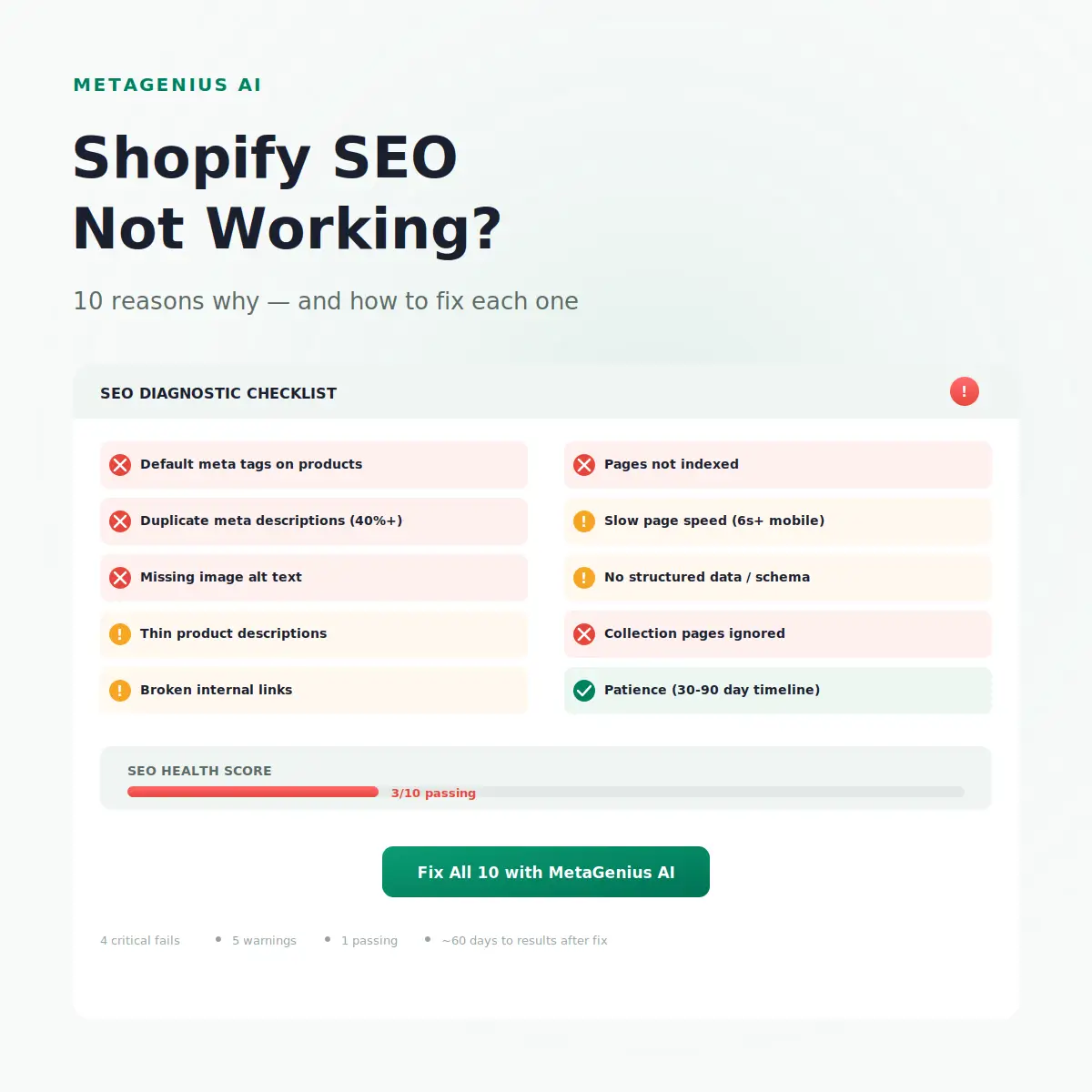
You installed a theme. You added products. Maybe you even installed an SEO app and ran it once. But your Shopify SEO isn't working — organic traffic is flat, rankings aren't moving, and Google seems to have forgotten your store exists.
Here's the uncomfortable truth: Shopify is a solid SEO platform out of the box. When Shopify SEO isn't working, the problem is almost always something the store owner missed — not a platform limitation. John Mueller has said it directly: Shopify handles the technical SEO basics well. The gaps are on-page, not infrastructure.
After auditing dozens of Shopify stores doing $10K–$500K/month, the same 10 issues surface repeatedly. This post covers each one with a specific diagnostic check and fix — no vague "improve your content" advice.
Reason 1: Your Meta Tags Are Still Shopify Defaults
This is the #1 reason Shopify SEO stalls, and it's the easiest to fix. Shopify auto-generates meta titles from your product name and meta descriptions from the first ~160 characters of your product description. The result: generic, keyword-empty tags that tell Google nothing useful about why your page should rank.
Open any product in your Shopify admin → scroll to "Search engine listing preview." If the title is just "Blue Running Shoes" and the description is the first sentence of your product copy, you have default meta tags. Multiply that across 200 products and you've got 200 pages competing with the same thin signals.
The fix: Write unique, keyword-targeted meta titles and meta descriptions for every product. For stores with 50+ products, doing this manually is economically irrational — a single freelance copywriter charges $25–$150 per page. MetaGenius AI generates them in bulk for $14.99/month, with a live Google SERP preview before you publish.
Reason 2: Duplicate Meta Descriptions Across Your Catalog
Even if you've written some meta descriptions, they might be duplicates. Shopify's collection pagination, tag-filtered URLs, and CSV imports all create accidental duplicates that you'll never spot from the admin dashboard.
Google's response to duplicates: ignore your description and auto-generate one from the page content. That auto-generated snippet is almost always worse for clicks. On a 500-product store with 40% duplicates, you're letting Google write 200 of your search snippets — and Google is a terrible copywriter.
The fix: Run a duplicate meta description audit with Screaming Frog (free for up to 500 URLs) or Google Search Console. Then bulk-generate unique descriptions across your catalog. MetaGenius AI reads each product's actual content and writes contextually unique descriptions — no shared templates.
Reason 3: Missing Image Alt Text on Product Photos
Google Image Search drives 20–30% of organic clicks in e-commerce verticals. If your product images have no alt text, you're invisible in image results — and you're failing WCAG 2.2 accessibility requirements at the same time.
The WebAIM Million 2026 report found that 55% of e-commerce sites fail basic alt text audits. That's your competitive gap: most of your competitors haven't fixed this either.
The fix: Generate alt text for every product image in your catalog. MetaGenius AI writes SEO-optimized, accessibility-ready alt text in bulk — covering every image across your product pages in minutes, not days.
Reason 4: Thin Product Descriptions
Google's March 2025 Core Update leaned harder into first-party content quality. Product pages with 50-word supplier descriptions — especially the same description used across hundreds of other dropshipping stores — are exactly the content this update was designed to suppress.
Cyrus Shepard's analysis of post-update ranking shifts showed that product pages with 200+ words of unique, descriptive content outperformed thin pages by a median of 3.2 ranking positions. That's the difference between page 1 and page 2.
The fix: Rewrite product descriptions in your own voice. You don't need essays — 150–300 words of unique content per product that describes what makes it different, who it's for, and why it matters. For imported products, use the supplier description as a starting point, then rewrite aggressively.
Reason 5: Broken or Missing Internal Links
Internal linking is how Google discovers and prioritizes pages on your site. A product page with zero internal links beyond the collection listing is an orphan — Google crawls it less frequently and assigns it lower importance.
Most Shopify stores rely entirely on navigation menus and collection grids for internal linking. That's a start, but it misses the highest-value links: contextual links within product descriptions, blog posts, and collection descriptions that pass topical relevance.
The fix: Audit your top 20 revenue-generating products. For each one, make sure it's linked from at least 3 sources beyond the collection grid — a blog post, a related product description, or a banner on the homepage. Your Shopify SEO checklist should include a quarterly internal link audit.
Reason 6: Pages Aren't Being Indexed
If Google hasn't indexed your pages, no amount of meta tag optimization will help. This is more common than most merchants realize — especially after bulk product imports, theme changes, or app installations that accidentally add noindex tags.
Open Google Search Console → Pages. Look for "Crawled - currently not indexed" and "Discovered - currently not indexed." These are pages Google found but chose not to include. If your product pages appear here, something is blocking them.
Common Shopify-specific culprits: apps that inject noindex meta tags (check by viewing page source → search for "noindex"), password-protected pages that were never unpublished, and theme code that accidentally blocks Googlebot on certain templates.
The fix: We wrote an entire guide on why your Shopify store isn't showing on Google — it covers every indexing scenario with step-by-step diagnostics.
Reason 7: Slow Page Speed Killing Mobile Rankings
Google's Core Web Vitals are a confirmed ranking factor. A Shopify store loading in 6+ seconds on mobile isn't just losing impatient shoppers — it's being actively demoted in mobile search results, which is where 65%+ of e-commerce traffic originates.
The usual suspects on Shopify: unoptimized hero images (2MB+ PNGs that should be 200KB WebPs), too many third-party apps injecting JavaScript, and render-blocking CSS from theme customizations.
The fix: Run PageSpeed Insights on your homepage and your highest-traffic product page. Focus on Largest Contentful Paint (LCP) — that's the metric most Shopify stores fail. Compress images, defer non-critical scripts, and audit installed apps (each app typically adds 50–200ms of load time).
Reason 8: No Structured Data (Schema Markup)
Structured data tells Google exactly what your page is — a product, a FAQ, a how-to guide. Without it, your search results are plain blue links. With it, you can earn rich snippets: star ratings, price, availability, and FAQ dropdowns that dramatically increase click-through rates.
Per Google's structured data documentation, Product schema with valid offers data is the minimum requirement for rich product results. Most Shopify themes include basic Product schema, but many don't implement it correctly — missing fields like aggregateRating, availability, or priceValidUntil prevent rich results from firing.
The fix: Test your product pages in Google's Rich Results Test. If they fail, add a structured data app or manually inject JSON-LD into your theme. For FAQ schema on blog posts and collection pages, tools like MetaGenius AI's schema integration handle the markup automatically.
Reason 9: Ignoring Collection Page SEO
Collection pages are some of the highest-value URLs on a Shopify store — they target broad category keywords ("women's running shoes") that individual product pages can't rank for. Yet most stores treat them as throwaway navigation pages with no custom content.
A collection page with just a grid of products and no description, no custom meta title, and no introductory content gives Google nothing to rank. Add 100–200 words of unique collection description, a keyword-targeted meta title, and a custom meta description, and that page suddenly has a chance against competitors who left theirs empty.
The fix: Follow our collection page SEO guide — it covers descriptions, meta tags, and internal linking structure specifically for Shopify collections.
Reason 10: Expecting Results Too Fast
SEO is not paid advertising. Changes you make today won't show up in rankings tomorrow. Google needs to recrawl your pages, reprocess the updated content, and reevaluate where your pages fit in the index. For a typical Shopify store, that cycle takes 30–90 days.
Marie Haynes has documented this extensively: even correct, high-quality SEO changes take 2–3 Google crawl cycles to fully manifest. If you made changes last week and rankings haven't moved, that's normal — not broken.
The exception: if you've been waiting 90+ days with zero movement, something else on this list is blocking you. Go back to Reasons 1–9.
The benchmark: Stores that fix meta tags + alt text + collection descriptions in a single push typically see measurable ranking improvements within 60 days. Not overnight — but significantly faster than "SEO takes a year."
How to Fix All 10 at Once
Here's the uncomfortable math. Of the 10 reasons above, three account for roughly 80% of the ranking drag on most Shopify stores: default meta tags (Reason 1), duplicate descriptions (Reason 2), and missing alt text (Reason 3). Fix those three, and the other seven become marginal optimizations rather than critical blockers.
MetaGenius AI was built specifically for this. In a single session, you can:
- Bulk-generate unique meta titles and descriptions for every product, collection, blog post, and page — with a live Google SERP preview before publishing.
- Bulk-generate image alt text for every product photo — SEO-optimized and WCAG-compliant.
- Auto-sync new products via Shopify webhooks, so every new product gets unique meta tags before it goes live.
A 500-product store gets fully de-duplicated meta descriptions, keyword-targeted titles, and accessibility-ready alt text in under 30 minutes. The same work manually takes 40+ hours. A freelance copywriter would invoice $12,500–$75,000 for the same catalog.
Fix the 3 biggest Shopify SEO killers in one afternoon.
MetaGenius AI generates unique meta titles, descriptions, and image alt text for your entire Shopify catalog — in bulk, with a SERP preview, in 15 languages.
Install Free on Shopify →Frequently Asked Questions
/products/ and /collections/ prefixes are fixed), and robots.txt customization is limited. But these are rarely the reason SEO isn't working. John Mueller has confirmed that Shopify handles technical SEO fundamentals well. The gaps are almost always on-page: default meta tags, thin content, and missing alt text.noindex tags from apps, password protection, or thin content that Google filtered out.Stop diagnosing. Start fixing.
MetaGenius AI fixes the three biggest Shopify SEO problems — default meta tags, duplicate descriptions, and missing alt text — in a single bulk run. Install free on Shopify, generate your first 10 meta tags, and see the SERP preview before you publish anything.
Install Free on the Shopify App Store →