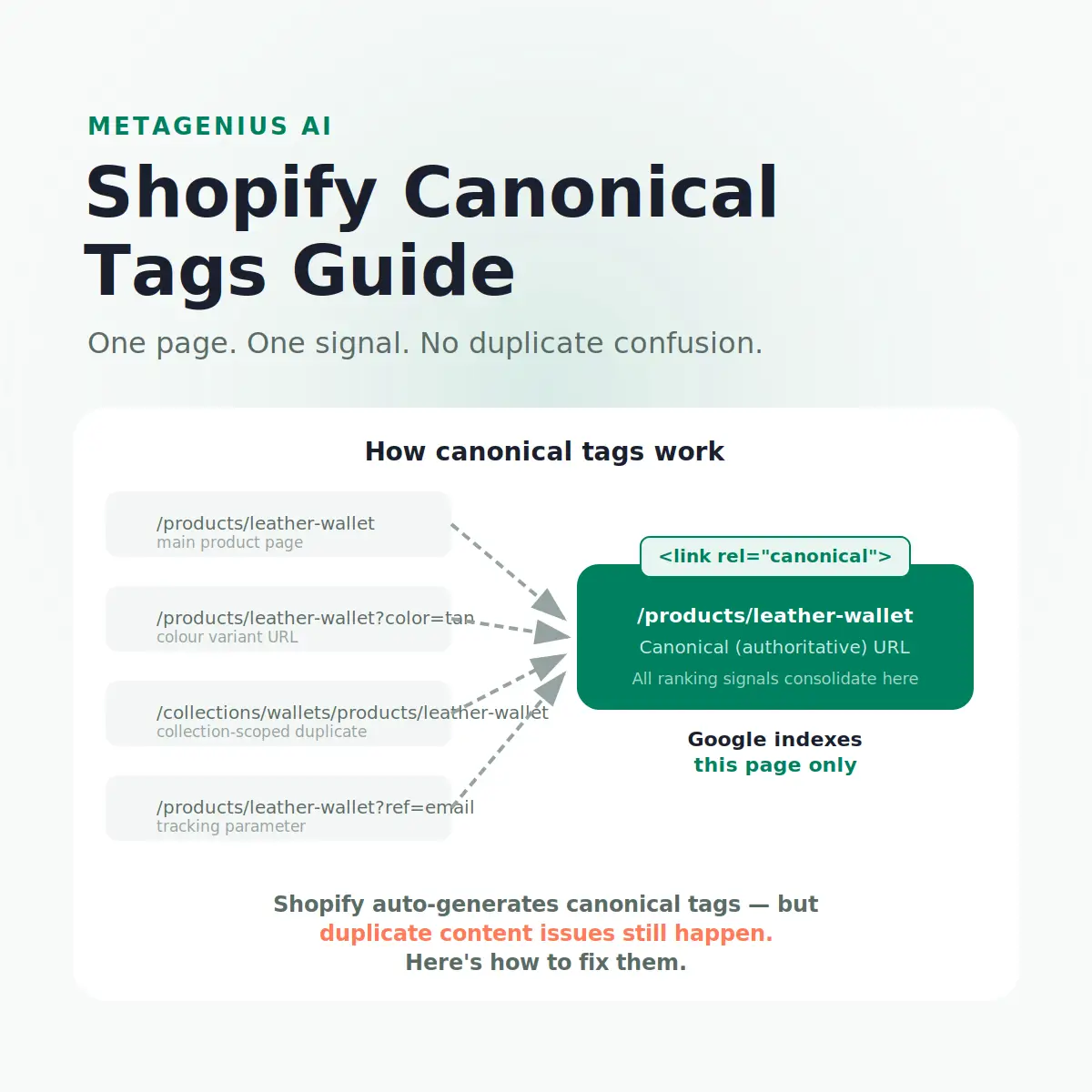
Shopify generates canonical tags automatically. That's genuinely useful — most platforms don't. But "auto-generated" doesn't mean "problem-free." A standard Shopify store creates multiple valid URLs for every product: the direct product URL, a collection-scoped version, variant parameter URLs, and potentially tracking-parameter variants from email and ad campaigns. Without a canonical tag working correctly, Google has to guess which one to rank — and it doesn't always guess right.
This guide explains how Shopify canonical tags work, what the platform gets right automatically, where things break, and how to audit and fix canonical issues without touching a line of code.
How Shopify Handles Canonical Tags Automatically
Shopify injects a canonical tag into every page via the theme's theme.liquid layout file. The tag is generated from the page's canonical URL — which Shopify determines based on content type:
- Products: canonical always points to
/products/[handle]— never to a collection-scoped URL - Collections: canonical points to
/collections/[handle] - Blog posts: canonical points to
/blogs/[blog-name]/[post-handle] - Pages: canonical points to
/pages/[handle] - Homepage: canonical points to your root domain
This is good default behaviour. Shopify's canonical implementation is one of the platform's stronger SEO features — unlike WordPress, where getting canonicals right requires plugin configuration, Shopify handles it out of the box for the majority of cases.
Where the auto-generation works well
For most stores, Shopify's auto-canonical correctly handles: variant URL parameters (?variant=123456 points back to the base product URL), collection-scoped product pages (/collections/wallets/products/leather-wallet gets a canonical to /products/leather-wallet), and pagination (/collections/wallets?page=2 is canonicalized to the first page).
Where it needs attention
The automation breaks — or becomes insufficient — in several specific scenarios that affect a meaningful percentage of Shopify stores. Those are covered in the next section.
The Duplicate URL Problem on Shopify
A single product in Shopify can be accessed through several structurally different URLs, all of which return HTTP 200 responses:
| URL type | Example | Canonical? |
|---|---|---|
| Product URL | /products/leather-wallet |
✓ This is the canonical |
| Collection-scoped | /collections/wallets/products/leather-wallet |
Canonicalized to product URL |
| Variant parameter | /products/leather-wallet?variant=98765 |
Canonicalized to product URL |
| Tracking parameter | /products/leather-wallet?ref=email&utm_source=klaviyo |
Canonicalized to product URL |
Shopify adds the canonical tag to all of these — but Google still crawls them all. This consumes crawl budget. For a 5,000-product store, that's potentially 15,000–20,000 URLs Google may crawl before it reaches your "real" pages. Gary Illyes from Google has noted that crawl budget is particularly relevant for large e-commerce stores — and duplicate URL proliferation is a primary cause of crawl inefficiency.
The real problem: what the canonical tag can't fix
Here's the counterintuitive part that most Shopify SEO guides miss: a canonical tag doesn't fix the underlying duplication — it just tells Google which version to prefer. If you have significant external backlinks pointing to a collection-scoped product URL (because that's the URL that appeared in your email newsletters), and your canonical tag points to the product URL, Google receives contradictory signals. It often honors the canonical — but not always, and the link equity split persists either way.
The fix isn't just the canonical tag. It's making sure all internal links, newsletter links, and external links point to the canonical URL consistently. As Cyrus Shepard has documented in multiple site audits, stores that set canonical tags but continue sending traffic to non-canonical URLs see minimal ranking improvement from the tags alone.
Common Canonical Tag Mistakes on Shopify
Linking to collection-scoped product URLs internally
This is the most common error. Shopify themes often generate "View product" buttons within collection pages that link to /collections/[name]/products/[handle] rather than /products/[handle]. The canonical tag correctly points to the product URL, but every internal link is passing equity to the non-canonical version. Google sees this contradiction and can decide the collection-scoped URL is actually the preferred one — overriding your canonical.
Fix: audit your theme's collection-page templates and update product link generation to always output /products/[handle]. In Liquid, this means using {{ product.url }} rather than {{ product.url | within: collection }}.
Self-referencing canonicals on paginated collections
By default, Shopify canonicalizes all paginated collection pages (/collections/wallets?page=2, ?page=3) back to the root collection URL. This means Google tends not to index deep pagination — which is usually correct SEO behaviour, but can cause issues if you have genuinely unique content spread across paginated pages. For most stores, this default is fine to leave alone.
Conflicting canonical from third-party apps
Some SEO apps or page-builder apps inject their own canonical tags, creating a page with two competing <link rel="canonical"> elements. Google will typically pick one — but not necessarily the right one. Run a source-code check on affected pages and ensure only Shopify's native canonical tag is present. Check your GSC Coverage report for "Alternate page with proper canonical tag" warnings as a signal this may be happening.
Canonical pointing to a 404
If you change a product handle (changing the slug) and the old URL redirects but the canonical tag on other pages still points to the old URL, Google may eventually discover that the canonical leads to a redirect chain or a 404. This is rare but worth checking after bulk product handle edits.
Missing canonical on custom landing pages
Pages built with page-builder apps (like Shogun or PageFly) sometimes generate pages that bypass Shopify's standard theme layout and therefore miss the automatic canonical injection. Check these pages individually using a browser source code inspection or a crawl tool.
How to Audit and Fix Canonical Issues on Shopify
Check your canonical tags are present
Open a product page, right-click → View Page Source, and search for rel="canonical". You should find exactly one tag, pointing to the clean product URL without parameters. If you find two — or none — there's a conflict to resolve.
Check GSC Coverage report
In Google Search Console, go to Indexing → Pages. Look for pages flagged as "Duplicate without user-selected canonical," "Alternate page with proper canonical tag," or "Duplicate, Google chose different canonical than user." These indicate canonical conflicts that Google has noticed.
Audit internal links to collection-scoped URLs
Use a site crawler (Screaming Frog, Ahrefs Site Audit) or GSC's Internal Links report to identify how many internal links point to /collections/[x]/products/[y] format. These should all be switched to /products/[y]. The fix is usually in the collection page Liquid template.
Verify canonical URLs are live and correct
Every canonical tag should point to a URL that returns HTTP 200 with the exact same canonical pointing back at itself (a self-referencing canonical on the target page). If the canonical points to a redirect or 404, that's a chain that needs resolving.
Check for app-injected duplicate canonicals
If you've installed review apps, page builders, or SEO plugins, check product page source for duplicate rel="canonical" tags. One tag per page. If there are two, find which app is injecting the extra and disable that setting.
Consolidate external links where possible
For product links sent in newsletters, social posts, or ad campaigns, always use the clean canonical URL (/products/[handle]) without UTM parameters in the href — add UTM as a separate analytics parameter if needed. Over time, consistent external linking to the canonical URL reinforces Google's preference.
Canonical tags fixed. Now make those pages earn their ranking.
MetaGenius AI bulk-generates SEO-optimized image alt text, meta titles, and descriptions for every canonical product page — in seconds, with a live Google SERP preview. Free plan, no credit card.
Install MetaGenius AI Free →Beyond Canonical: What Actually Determines Ranking
Getting your canonical tags right is a prerequisite — it ensures Google indexes the right URL. But canonical tags don't improve rankings on their own. A correctly canonicalized product page at position 47 stays at position 47 until the on-page signals improve.
What moves rankings from there: a keyword-optimized meta title that matches search intent, a meta description that drives clicks in the SERP, image alt text that opens up image-search traffic, and content that genuinely answers the searcher's question. The August 2024 Core Update placed heavy weight on E-E-A-T signals — demonstrating first-hand expertise and real product knowledge — making thin, templated product pages a ranking liability even when technically well-structured. For the full picture on what comes after technical SEO, see our complete Shopify SEO guide.
For a 200-product catalog, optimizing meta titles, descriptions, and alt text manually takes weeks. MetaGenius AI generates all three across your entire catalog in minutes — keyword-aware, brand-voice consistent, with a live Google preview before anything goes live. The technical SEO (canonical tags, sitemap, URL structure) gets your pages in front of Google. The on-page SEO gets them clicked.
Frequently Asked Questions
/products/[handle] — not collection-scoped or parameter variants. You don't need to add canonical tags manually on a standard Shopify theme. The main risk is third-party apps adding a second, conflicting canonical.rel="canonical". You should find exactly one tag pointing to the clean product URL without parameters. You can also check Google Search Console under Indexing → Pages for coverage issues like "Duplicate without user-selected canonical" or "Alternate page with proper canonical tag" — these signal canonical conflicts.theme.liquid using Shopify's canonical_url variable. You can override it for specific templates by modifying the relevant section. However, Shopify's default canonical behaviour is correct for most stores — only override if you have a specific need, and always test in a development theme first.Canonical tags tell Google what to index. Meta tags tell Google what to rank.
MetaGenius AI bulk-generates image alt text, meta titles, and descriptions for every canonical product, collection, and page in your Shopify store — in seconds, in 15+ languages, with a live Google SERP preview before you publish anything.
Install Free on the Shopify App Store →