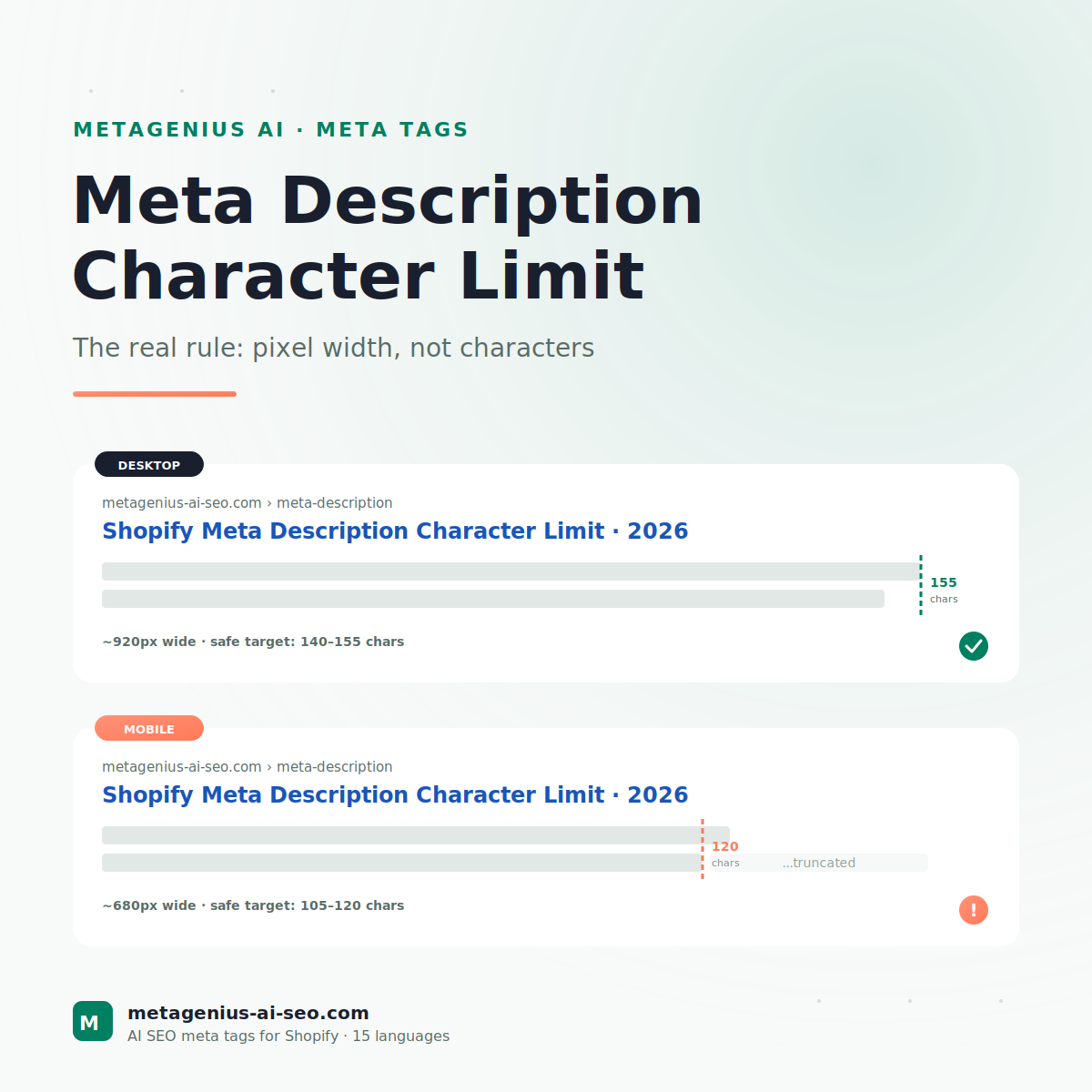
Type "meta description character limit" into Google and the first ten results all tell you the same thing: 155 characters. Some say 160. One outlier says 158. They're all giving you a rule that was true in 2017 and is wrong enough in 2026 to cost you visible SERP space.
The actual rule Google uses isn't character-based at all. It's pixel width — and that distinction matters more than ever now that mobile searches generate over 60% of e-commerce traffic. A 152-character description full of narrow letters fits. A 140-character description full of wide letters gets truncated with an ellipsis. Same character count, different SERP outcome.
This guide gives you the real rule, the safe character targets that work as a useful proxy, the Shopify-specific quirks (Shopify gives you no character limit at all in the admin), and a practical method for fixing your existing descriptions without rewriting them all from scratch.
The Real Rule: Pixel Width, Not Characters
Google's snippets are rendered in a fixed-width container. The container is approximately 920 pixels wide on desktop and 680 pixels wide on mobile. Once your description exceeds that width in pixels, Google truncates it and adds an ellipsis (the "..." you see on every other search result).
Why characters are a bad proxy: not all letters take the same width. The capital W in Arial is roughly 13 pixels wide. The lowercase i is roughly 3 pixels. A 150-character description full of capital Ms and Ws will hit the pixel limit at maybe 120 characters in. A 150-character description full of i's, l's, and t's can comfortably fit 170+ characters.
Per Google's official snippet guidance, there is "no maximum length for snippets" — they're truncated based on the visual rendering. This is also why John Mueller has repeatedly pushed back on the "155 characters" rule of thumb in his office-hours streams. It's a heuristic, not a spec.
The mobile reality
The number that actually matters most in 2026 isn't the desktop limit. It's mobile. The mobile SERP shows about 680 pixels of description, which translates to roughly 105-120 characters for typical English text. If you write to the 155-character desktop limit, your mobile users see your first 105 characters plus an ellipsis. Whatever ranked-keyword or CTA you put at the end? Invisible.
Cyrus Shepard's testing across 2024-2025 found that descriptions written tight to ~120 characters consistently outperformed 155-character descriptions on mobile-dominant search queries — by 8-14% on CTR. Worth knowing before you write your next 50 product descriptions.
Safe Character Targets (The Useful Proxy)
Since you can't easily measure pixel width while writing, character counts are still a useful proxy — as long as you treat them as ceilings, not targets.
| Where shown | Safe target | Maximum | What happens at max+ |
|---|---|---|---|
| Desktop SERP | 140-155 chars | ~160 chars | Truncated with ellipsis |
| Mobile SERP | 105-120 chars | ~130 chars | Truncated with ellipsis |
| Open Graph (Facebook share) | 125-200 chars | 300 chars | Truncated in feed preview |
| Twitter card | 125-200 chars | 200 chars | Hard-cut at 200 |
The 120-character discipline
The smartest play in 2026 is to write the key message in the first 120 characters, then use the remaining 30-35 characters (up to ~155 total) for a soft CTA or a secondary benefit. That way:
- Mobile users see the complete key message
- Desktop users see the bonus CTA
- Neither sees a truncation ellipsis
This is a small discipline that compounds across hundreds of product pages. On a 200-product Shopify store, an 8% mobile CTR lift from tighter descriptions translates to several thousand additional sessions per year — at roughly zero marginal cost.
Shopify-Specific Quirks
Shopify doesn't help you here. Where most CMSes (WordPress with Yoast, BigCommerce, even Wix) show a character counter as you type the meta description, Shopify's admin gives you a plain textarea with zero feedback. You can paste 500 characters in and the admin will happily save it.
1. No character counter in the admin
Go to Admin → Products → any product → scroll to "Search engine listing" → "Edit website SEO." Type whatever you want into the Meta description field. Shopify will save it. No warning, no counter, no preview at the real SERP width.
The workarounds: use a browser extension like SEO META in 1 CLICK to spot-check after publish, or use a Shopify SEO app that includes a live SERP preview. MetaGenius AI's live Google preview, for example, shows you the desktop and mobile rendering side by side before you save.
2. The default fallback is bad
If you leave the meta description field blank, Shopify outputs nothing — and Google generates one from your page content, usually pulling the first sentence of your product description. If that first sentence is "Made from premium materials, this product is designed to..." then that's what shows in the SERP. Functional but wasted.
3. The 320-character "snippet" myth
You'll occasionally hear that "Google now shows 320-character snippets!" — this was true for about six months in late 2017 before Google reverted the change. It's been false since early 2018. If you're reading a guide that quotes 320 characters as the target, the guide is at least seven years out of date. Skip it.
4. Shopify Markets adds a wrinkle
If you sell in multiple languages via Shopify Markets, each language version needs its own meta description — written natively in that language, not machine-translated. A German description should be ~10% shorter than English (German words run longer per concept), and the pixel-width math shifts accordingly. Aleyda Solis has written extensively on this exact issue in her international SEO work.
Why Google Rewrites Yours Anyway (And When It Doesn't)
Here's the part most character-limit guides skip. Google's own data has shown for years that approximately 70% of meta descriptions are rewritten in the SERP based on the specific user query. Your carefully-crafted 152-character description gets replaced with whatever Google thinks better matches what the searcher typed.If you're not sure how long your descriptions should be, the answer is 155 characters desktop / 120 mobile — but it's actually about pixel width, not character count.
So why bother with character limits at all? Because the 30% that does show verbatim is where you compete on click-through rate. And the queries where Google shows your description tend to be the highest-intent ones — brand searches, exact product matches, queries that already match your title closely. Losing those clicks because your description got truncated mid-sentence is the avoidable mistake.
When does Google show your description verbatim?
- Brand-name and exact-match queries. If someone searches "yourstore running shoes," Google usually trusts your description.
- High keyword density match. When your description contains close to verbatim phrases the searcher used.
- Newer pages with limited content to extract from. Google has less to work with, so it falls back to your description.
- Featured snippets and "0-click" placements. These often pull your description directly.
How to Fix Existing Descriptions Without Rewriting Everything
If you've got 200 products with descriptions you wrote two years ago to a 160-character target, you don't need to throw them all out. You need a triage.
Step 1: Find the offenders
Pull a list of all your product pages and their current meta descriptions. The fastest method:
- Use Screaming Frog (free for <500 URLs) to crawl your store and export meta descriptions to CSV
- Or use Google Search Console → Performance → Pages, then click each one to see what's showing
- Or use a Shopify SEO app that surfaces this in the admin
Step 2: Filter to the high-traffic offenders
Don't fix everything. Sort by impressions in Search Console. The top 20% of pages drive 80% of your meta description impressions. Fix those first.
Step 3: Apply the 120-char rule
For each high-traffic offender, check whether the first 120 characters contain:
- The primary keyword (preferably near the start)
- A clear benefit or value prop
- A natural sentence end (or at least a clean phrase break)
If yes, leave the description alone — even if it's longer than 155 chars, mobile users will see the important part. If no, rewrite just that prefix.
Step 4: Track CTR over 30 days
In Google Search Console → Performance → Compare last 28 days with previous 28 days. Look at CTR shifts on the pages you edited. Modest CTR lifts (3-8%) on the fixed pages confirm the change worked; large or no movement usually means the description wasn't the bottleneck.
Fix the top 50 descriptions in one afternoon, not three weeks.
MetaGenius AI bulk-rewrites meta descriptions to pixel-width-aware targets (with live SERP preview before you save). 100 descriptions in ~3 minutes of generation. Free plan available; Pro is $14.99/month for 500 generations.
Install Free on Shopify →Real Examples (Good and Bad)
Bad: Over-long, key info at the end (165 chars)
"Discover our complete collection of handcrafted leather wallets, made in Italy with traditional techniques and premium full-grain leather. Free worldwide shipping over $100."
Problem: The conversion driver ("Free worldwide shipping over $100") is at position 145+ chars — it shows on desktop but gets cut off on mobile, where most users actually see this. The first 120 mobile-visible chars are all descriptive fluff.
Better: Same info, restructured (148 chars)
"Handcrafted Italian leather wallets, full-grain. Free worldwide shipping over $100. Made with traditional techniques in Florence since 1987."
Why it works: The keyword phrase ("Italian leather wallets") and the conversion driver ("Free worldwide shipping over $100") both land in the first 90 characters — fully visible on mobile. The brand-history flourish at the end is desktop-only bonus content.
Bad: Keyword stuffing (152 chars)
"Best leather wallets, premium leather wallets, Italian leather wallets, handcrafted leather wallets — shop the best leather wallets online today."
Problem: Reads like spam. Google's quality systems have flagged this pattern since the 2019 BERT update and increasingly demote it. Also, no human clicks this.
Better: Natural language, one keyword (147 chars)
"Handcrafted Italian leather wallets in 12 styles, full-grain only. Free worldwide shipping over $100 — most orders ship within 24 hours."
Why it works: One natural keyword integration, specific numbers that build trust, two reasons to click (free shipping + fast dispatch). Reads like a human wrote it. Sits comfortably under the mobile cutoff.
Frequently Asked Questions
Stop guessing where Google will truncate your descriptions.
MetaGenius AI's live SERP preview shows you the desktop AND mobile rendering before you save — for every product, collection, and page. Free plan, 30-second install.
Install Free on the Shopify App Store →