Why Alt Text Examples Matter More Than Rules
Every SEO guide tells you to "write descriptive alt text." That's like telling a chef to "make food taste good." The advice is technically correct and practically useless without concrete examples of what descriptive actually looks like for your specific product category.
The 2026 WebAIM Million report found that more than one in four images on popular websites has alt text that's either absent or inadequate. For e-commerce catalogs — where a single product can have 4–8 images across color variants and angles — the gap is wider still. Most merchants don't skip alt text because they disagree with the advice. They skip it because they can't picture what good alt text looks like for their navy crew-neck sweater or their ceramic pour-over set.
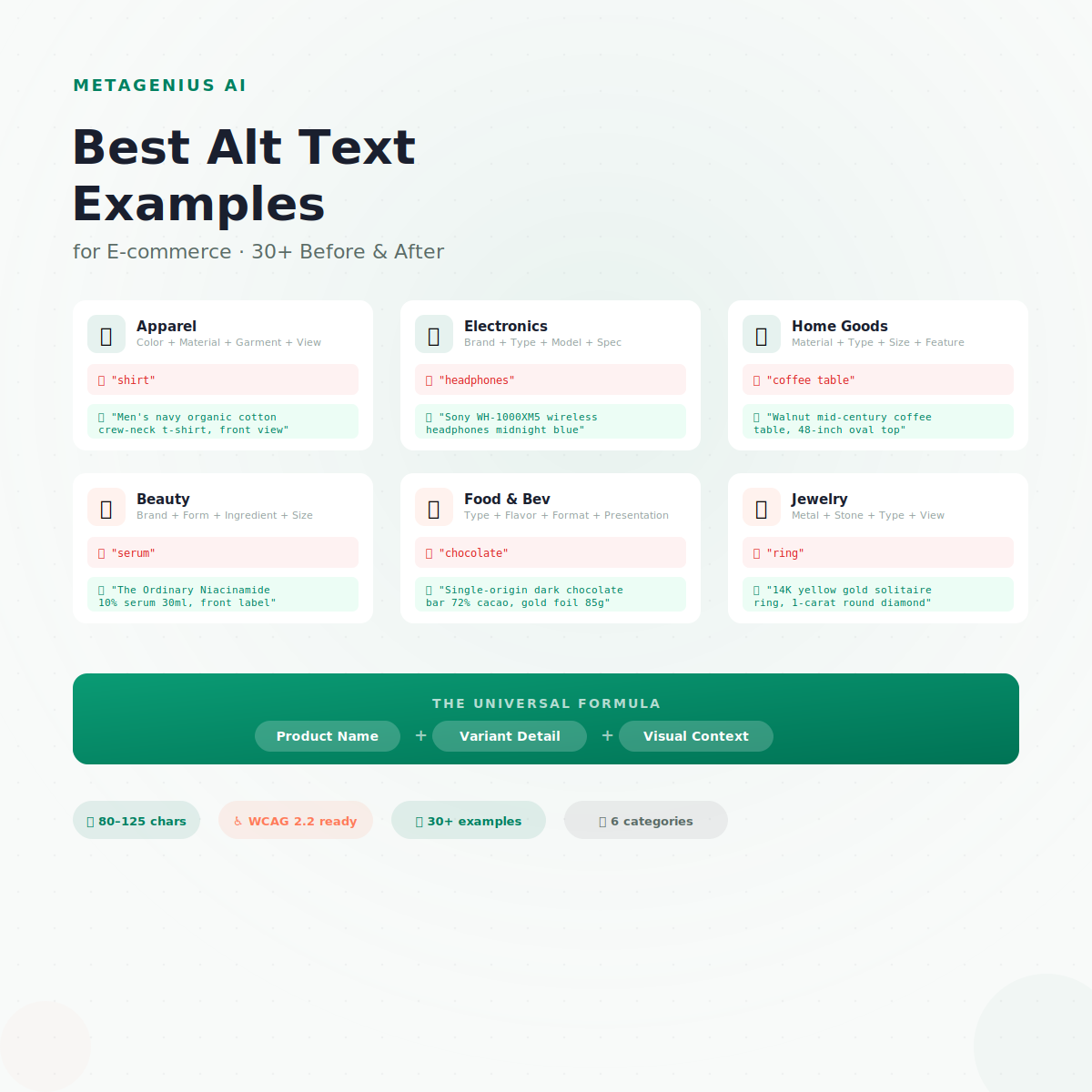
This guide fixes that. Below you'll find 30+ real before-and-after examples across six product categories. Every "good" example follows the same formula, stays under 125 characters, and works for both screen readers and Google Images. Copy the pattern, adapt to your catalog.
The Universal Alt Text Formula
Before the examples, here's the formula they all follow:
[Product name] + [key variant detail] + [visual context]
Three components. One natural sentence. Under 125 characters. That's the sweet spot where screen readers read the description in a single breath and Google has enough signal to rank your image for relevant queries.
John Mueller has been specific about this: you don't necessarily need to describe exactly what's in the image. Instead, describe what the image means for your page. For product images, that means including the product identity (name, brand), the differentiating detail (color, material, size), and the visual angle or context (front view, lifestyle setting, close-up).
Cyrus Shepard's "phone test" is the quality check: read the alt text aloud to someone who can't see the image. If they can picture the product and understand which photo they're hearing about, it passes. If it sounds like keyword soup or a generic label, rewrite it.
For the full how-to behind this formula, see our guide to writing good alt text. Here, we focus purely on examples.
Apparel Alt Text Examples
Apparel is where alt text matters most — and where it fails most often. A store with 200 garments in 5 colors each has 1,000+ images to describe. Here's what separates useless from useful:
Template: {Color} {Material} {Garment Type} {Style}, {Fit/View}
| Image scenario | ❌ Bad | ✅ Good |
|---|---|---|
| Product on white | "shirt" (5 chars) | "Men's navy organic cotton crew-neck t-shirt, front view" (56 chars) |
| Lifestyle shot | "model wearing clothes" (21 chars) | "Woman wearing olive linen wrap dress walking on cobblestone street" (65 chars) |
| Close-up detail | "detail" (6 chars) | "YKK brass zipper detail on waxed canvas field jacket in tan" (59 chars) |
| Back view | "shirt back" (10 chars) | "Women's heather grey merino hoodie, back view showing seam placement" (68 chars) |
| Size chart | "sizes" (5 chars) | "Size chart: chest, waist, and hip measurements in inches for XS through 3XL" (75 chars) |
Notice: every good example includes the garment type, a material or color, and the specific view. That's three signals Google can use to match this image to a long-tail query like "navy organic cotton t-shirt front view."
Electronics Alt Text Examples
Electronics buyers search by model number, spec, and brand. Your alt text should capture those identifiers because they match high-intent purchase queries exactly.
Template: {Brand} {Product Type} {Model} {Color}, {Key Spec or View}
| Image scenario | ❌ Bad | ✅ Good |
|---|---|---|
| Product hero | "headphones" (10 chars) | "Sony WH-1000XM5 wireless headphones in midnight blue, side profile" (66 chars) |
| Packaging shot | "product box" (11 chars) | "Anker 65W USB-C charger retail box showing included cable and adapter" (69 chars) |
| In-use lifestyle | "person using laptop" (19 chars) | "Developer typing on Keychron Q1 mechanical keyboard at standing desk" (68 chars) |
| Spec diagram | "specs" (5 chars) | "Dimensions diagram for Samsung T7 portable SSD, 85mm x 57mm x 8mm" (66 chars) |
| Color variant | "red phone" (9 chars) | "iPhone 15 Pro in natural titanium, rear camera array close-up" (61 chars) |
SKU and model numbers in alt text catch searches from buyers who already know exactly what they want. "PB15-2026" in the alt text captures the person searching that exact part number.
Home Goods Alt Text Examples
Home goods cover everything from furniture to kitchenware. The key differentiator is material and dimension — shoppers search for "solid oak dining table 72 inch," not just "table."
Template: {Material} {Product Type} {Size/Dimension}, {Feature or Setting}
| Image scenario | ❌ Bad | ✅ Good |
|---|---|---|
| Product hero | "coffee table" (12 chars) | "Walnut mid-century coffee table with tapered legs, 48-inch oval top" (68 chars) |
| Room setting | "living room" (11 chars) | "Linen sectional sofa in oatmeal styled in Scandinavian living room" (66 chars) |
| Detail close-up | "detail" (6 chars) | "Dovetail joint close-up on solid cherry bedside drawer" (55 chars) |
| Kitchenware | "mug" (3 chars) | "Handmade blue speckled ceramic mug, 12oz, held in hand showing scale" (69 chars) |
| Outdoor | "garden furniture" (16 chars) | "Teak Adirondack chair with weather-resistant finish on cedar deck" (65 chars) |
Beauty & Skincare Alt Text Examples
Beauty buyers search by concern (anti-aging, hydrating), ingredient (retinol, niacinamide), and product form (serum, cream). Your alt text should hit at least one of these plus the brand name.
Template: {Brand} {Product Form} {Key Ingredient/Benefit} {Size}, {View}
| Image scenario | ❌ Bad | ✅ Good |
|---|---|---|
| Product hero | "serum" (5 chars) | "The Ordinary Niacinamide 10% serum 30ml dropper bottle, front label" (67 chars) |
| Swatch/texture | "cream texture" (13 chars) | "Rich moisturizer swatch on wrist showing thick, whipped texture" (63 chars) |
| Bundle/set | "products" (8 chars) | "Complete anti-aging routine set: cleanser, toner, serum, and SPF50 moisturizer" (78 chars) |
| Ingredient hero | "ingredient" (10 chars) | "Vitamin C crystals and fresh orange slices arranged next to brightening serum" (76 chars) |
| Before/after | "results" (7 chars) | "Before and after comparison: skin texture after 8 weeks of retinol treatment" (76 chars) |
Food & Beverage Alt Text Examples
Food images drive strong Google Images traffic — people search visually for recipes, ingredients, and specific products. Flavor, origin, and packaging format are the key details.
Template: {Brand/Type} {Flavor/Variety} {Format/Size}, {Presentation}
| Image scenario | ❌ Bad | ✅ Good |
|---|---|---|
| Product hero | "chocolate" (9 chars) | "Single-origin dark chocolate bar 72% cacao, gold foil wrapper, 85g" (66 chars) |
| Coffee bag | "coffee" (6 chars) | "Ethiopian Yirgacheffe whole-bean coffee 340g bag with tasting notes label" (73 chars) |
| Styled shot | "food on plate" (13 chars) | "Matcha latte in ceramic cup with foam art, served on wooden tray" (64 chars) |
| Ingredients flat lay | "ingredients" (11 chars) | "Hot sauce ingredients flat lay: habanero peppers, garlic, sea salt, vinegar" (74 chars) |
| Subscription box | "box" (3 chars) | "Monthly artisan snack subscription box with 8 individually wrapped items" (72 chars) |
Jewelry Alt Text Examples
Jewelry is a high-ticket, visually-driven category where Google Lens drives significant product discovery. Precise metal, stone, and carat details capture long-tail searches that convert.
Template: {Metal} {Stone/Detail} {Jewelry Type} {Style}, {View or Worn}
| Image scenario | ❌ Bad | ✅ Good |
|---|---|---|
| Product hero | "ring" (4 chars) | "14K yellow gold solitaire engagement ring with 1-carat round diamond" (68 chars) |
| Worn on model | "necklace model" (14 chars) | "Sterling silver layered chain necklace set worn on model with v-neck top" (72 chars) |
| Detail close-up | "close up" (8 chars) | "Pavé diamond setting close-up on platinum wedding band, 0.5ct total" (68 chars) |
| Gift box | "box" (3 chars) | "Pearl stud earrings in velvet gift box with branded ribbon" (58 chars) |
| Scale shot | "bracelet on hand" (16 chars) | "Rose gold cuff bracelet 6mm wide on wrist showing relative scale" (64 chars) |
The 5 Most Common Alt Text Mistakes (With Fixes)
These mistakes show up in almost every Shopify store audit. Each one costs you image search traffic, accessibility compliance, or both.
1. Using the filename as alt text
"DSC_0042.jpg" or "hero-banner-final-v3" tells nobody anything. Screen readers announce it character by character — agonizing for the user. Fix: replace with a real product description using the formula above.
2. Copying the product title for every image
If your product has 6 images and all of them share the alt text "Navy Merino Sweater," Google sees 6 duplicate signals and screen reader users can't tell which photo they're on. Fix: differentiate by angle, detail, and context. Front view, back view, close-up of collar, styled on model — each gets unique alt text.
3. Keyword stuffing
"Best navy sweater buy merino wool cheap sweater men 2026 free shipping" is a spam signal to Google and a terrible screen reader experience. Mueller has been blunt: one or two natural keywords per image. Quality always beats density.
4. Starting with "Image of" or "Photo of"
Screen readers already announce the element as an image. "Image of navy sweater" is like saying "This sentence says that…" Redundant words that eat your 125-character budget.
5. Leaving decorative images without empty alt
Background patterns and section dividers need alt="" (empty string). Without it, some screen readers try to read the filename, cluttering the experience. The test: if removing the image loses no information, it's decorative — give it empty alt, not descriptive alt.
Writing Alt Text Examples at Scale
The examples above prove a pattern: once you have the formula for your product category, writing alt text becomes a template exercise — [Product] + [Variant] + [View]. The challenge isn't knowing what to write. It's writing it 2,000 times across your catalog.
A 500-product store with 4 images per product = 2,000 unique alt text descriptions. At 45 seconds each, that's 25+ hours of manual typing. At $25–$150/page for a freelance copywriter, you're looking at thousands of dollars for a single pass.
MetaGenius AI follows these same formulas automatically. It reads your Shopify product data — title, description, variant attributes — and generates category-aware alt text in bulk. A 500-product catalog takes about 15 minutes to generate, plus 30–60 minutes to review and tweak the 5–10% that need adjustment. At $4.99–$14.99/month, it costs less than a single page of freelance copywriting.
For a walkthrough of every bulk method — admin editor, CSV, API, and AI — see our guide to bulk adding alt text in Shopify.
Turn these examples into 2,000 unique descriptions. Automatically.
MetaGenius AI generates alt text matching these formulas for every product image in your Shopify store. Free plan includes 10 generations. Review everything before it goes live.
Install Free on Shopify →Frequently Asked Questions
Stop guessing. Start generating.
MetaGenius AI writes alt text using these same category-aware formulas for every product image in your Shopify store — in bulk, in seconds, in 15 languages. Install the app. Select your products. Click "Generate." Review and publish.
Install Free on the Shopify App Store →