Search "alt text character limit" and you'll get a confident answer from dozens of SEO guides: 125 characters. Some say 100. Some say 140. Google's own documentation says nothing about a character limit at all. The accessibility community is split. And most Shopify merchants are left writing alt text based on a number that nobody agrees on and nobody can source properly.
This post cuts through the noise. We'll trace where the 125-character claim actually came from, what screen readers actually do when alt text gets long, what Google actually cares about, and — most practically — the optimal alt text character limit for Shopify product images in 2026.
The 125-Character Myth — Where It Actually Came From
The claim that alt text has a 125-character limit appears in hundreds of SEO and accessibility guides. Almost none of them cite a primary source — because the primary source doesn't say what they think it says.
The origin is a 2020 test by Terrill Thompson at the University of Washington. Thompson tested how major screen readers handle long alt text and documented the JAWS behavior: in line-by-line reading mode (when a user navigates a page using the down-arrow key), JAWS pauses after approximately 125 characters. It reads the next chunk when the user presses down-arrow again.
That's a pause, not a cutoff. JAWS doesn't truncate or discard text past 125 characters. It keeps going — one chunk at a time. Accessibility expert Eric Eggert addressed this directly in a widely-cited debunk, confirming that no modern screen reader truncates alt text at any character count. The confusion likely started when someone misinterpreted the JAWS line-break pause as a hard limit, and the claim went viral across SEO blogs that copied each other without checking.
There's a parallel to the meta description character limit myth. Google doesn't enforce a character limit on meta descriptions either — it truncates based on pixel width (~920px desktop). But "155 characters" became shorthand because it's close enough to be practical. The 125-character alt text number works the same way: it's a useful guideline, not a technical constraint.
What Actually Happens at 125 Characters
Here's what each major screen reader does with long alt text, based on actual testing:
- JAWS (Windows) — in line-by-line mode, pauses at ~125-character intervals. In "say all" mode, reads the entire alt text without stopping. No truncation either way.
- NVDA (Windows) — reads the full alt text without pausing or truncating, regardless of length.
- VoiceOver (macOS/iOS) — reads the full alt text without pausing or truncating.
- TalkBack (Android) — reads the full alt text without pausing or truncating.
The practical takeaway: only JAWS introduces a pause, and only in one specific navigation mode. But JAWS is also the most widely used enterprise screen reader, so the 125-character guideline makes sense as a design target — not because text gets cut off, but because a single-chunk reading experience is smoother than a multi-chunk one.
If your alt text is 130 characters and reads naturally, it's fine. If it's 200 characters and could be tightened, it should be.
Google's Perspective: No Alt Text Character Limit at All
Google has never published an alt text character limit. John Mueller addressed this directly in a Google Search Central Office Hours hangout, debunking the myth of a 16-word limit that had circulated in the SEO community.
Mueller's exact position: Google processes the full alt text string, regardless of length. There is no 16-word limit, no 125-character limit, no limit at all from Google's indexing perspective. The 16-word myth came from a flawed SEO experiment that used nonsense words — and as Mueller explained, Google's algorithms behave differently with real words versus gibberish, making the test results meaningless.For the exact numbers behind the optimal length range, see our alt text character limit breakdown.
What Google does care about is quality. Google's Image SEO documentation says to write alt text that's "useful, information-rich content that uses keywords appropriately and is in context of the content of the page." No mention of length limits — just relevance and quality.
Google's spam policies do warn against keyword stuffing in alt text. The risk isn't writing too many characters — it's padding those characters with repeated keywords instead of genuine description.
The Optimal Alt Text Character Limit for E-commerce
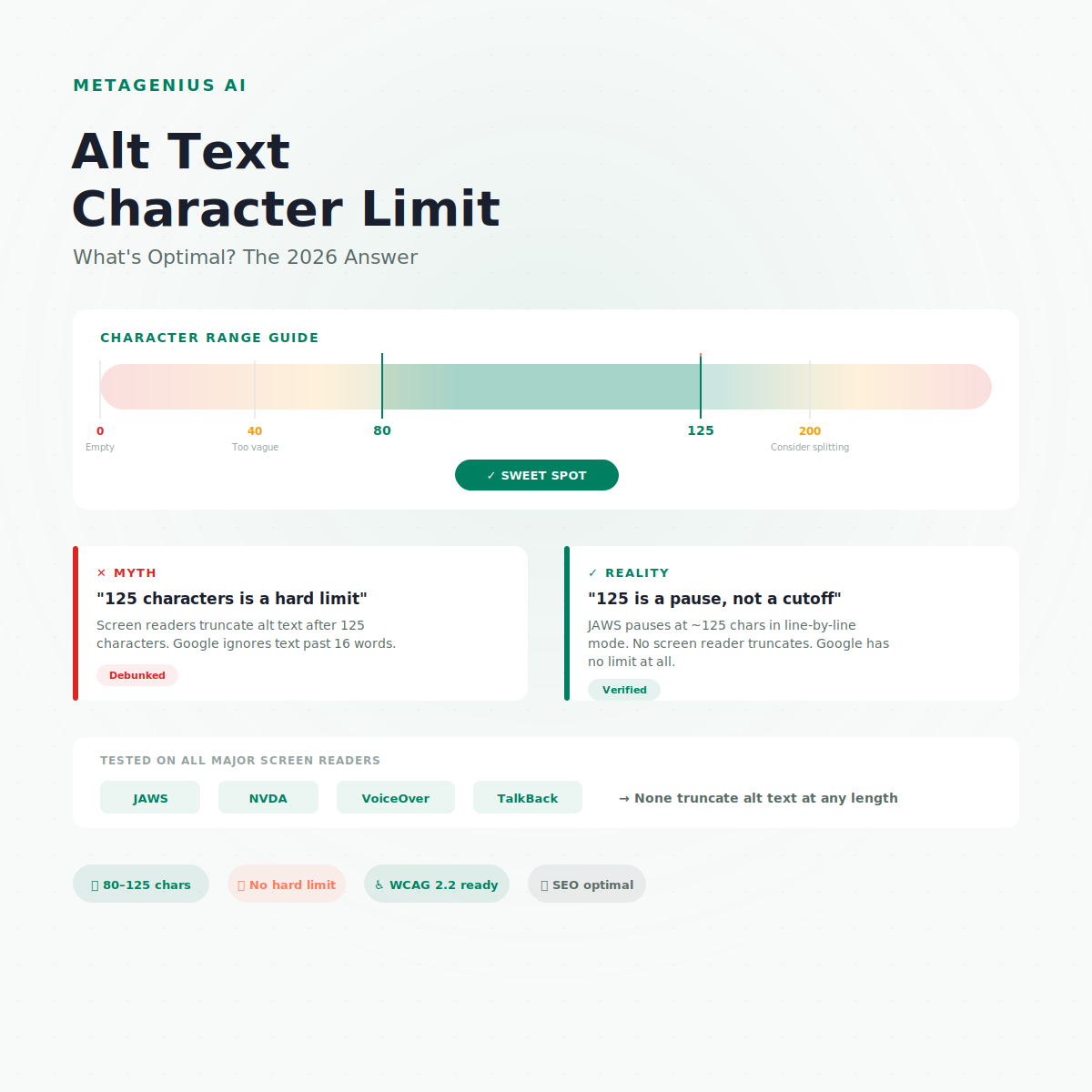
Combining the screen reader data, Google's guidance, and practical e-commerce needs, the optimal range is 80–125 characters. Here's the reasoning:
- Below 40 characters — almost always too vague to be useful. "Blue shirt" is 10 characters and tells Google almost nothing about which blue shirt among millions of blue shirts on the internet.
- 40–79 characters — works for simple products. "Men's navy organic cotton t-shirt, front view" (46 chars) is adequate if the product is genuinely that simple.
- 80–125 characters — the sweet spot. Long enough to include product name, variant detail (color, material, size), and visual context (angle, setting). Short enough to read as a single JAWS chunk.
- 126–200 characters — acceptable for complex products. JAWS pauses mid-description, but the user still hears everything. Use this range when the image genuinely needs more context — multi-item bundles, detailed charts, infographics.
- 200+ characters — consider splitting. If an image needs 200+ characters of description, it might be an infographic or chart that deserves a
longdescor an adjacent text description on the page instead.
For most Shopify product images — a product on a white background, a lifestyle shot, a close-up detail, a color variant — 80–125 characters captures everything that matters.
For real examples across six product categories, see our 30+ before-and-after alt text examples. Every "good" example in that guide falls within this range.
Too Short vs Too Long: Real Examples
The best way to internalize the optimal range is to see the extremes.
| Alt text | Length | Verdict |
|---|---|---|
| "shirt" | 5 chars | ✕ Too vague — no color, material, brand, or view |
| "Blue shirt front" | 16 chars | ✕ Better, but missing material, fit, product name |
| "Men's navy organic cotton crew-neck t-shirt, front view" | 56 chars | ✓ Solid — includes all key details for a simple product |
| "Women's Italian lambskin leather biker jacket in burgundy, asymmetric zip, worn by model on urban street" | 104 chars | ✓ Optimal — descriptive, single JAWS chunk, natural |
| "Best men's premium navy organic cotton sustainable eco-friendly crew-neck t-shirt top tee comfortable casual front view on white background for summer 2026 free shipping" | 168 chars | ✕ Keyword-stuffed spam — Google flags this, screen readers suffer |
Notice: the 104-character example is longer than the 56-character one, but both pass the quality test. Length isn't the issue — relevance per character is. A tight 56-character description beats a padded 168-character one every time.
When Images Need More Than 125 Characters
Some images genuinely need longer descriptions. The 80–125 range works for product photos, but these situations are different:
Infographics and data charts
A pie chart showing revenue by region or an infographic breaking down product features can't be meaningfully described in 125 characters. The WCAG 2.2 approach: use a short alt text that summarizes what the image is ("Revenue by region, Q1 2026"), then provide the full data in an adjacent HTML table or in a linked description.
Size charts and spec diagrams
A size chart with measurements for 8 sizes can't fit in alt text. Best practice: provide the sizing data in an HTML table on the page (which helps SEO too), and use alt text that points there — "Size chart for XS through 3XL. See measurements table below."
Images with embedded text
Sale banners ("30% OFF SUMMER SALE — Use code SUN30") need the text content reproduced in the alt attribute. If the embedded text exceeds 125 characters, reproduce it anyway — accessibility trumps the character guideline when the two conflict.
For more on these edge cases, see our complete guide to writing good alt text.
Hitting the Right Alt Text Character Limit at Scale
Knowing the optimal range is step one. Applying it across 2,000 product images is step two — and that's where it gets hard. A 500-product Shopify store with 4 images each needs 2,000 alt text descriptions, all in the 80–125 character range, all unique, all descriptive.
Quick disclosure: we make MetaGenius AI. It generates alt text within this optimal range by default — reading your product titles, descriptions, and variant attributes, then producing descriptions that land in the sweet spot without you counting characters manually. At $4.99–$14.99/month, that's less than one freelance product-page rewrite.
For the full breakdown of every bulk method, see our guide to bulk adding alt text in Shopify.
80–125 characters. Every image. Automatically.
MetaGenius AI writes alt text in the optimal range for every product image in your Shopify catalog. Free plan includes 10 generations — see the output quality before you commit.
Install Free on Shopify →Frequently Asked Questions
Stop counting characters. Start generating.
MetaGenius AI writes alt text in the optimal 80–125 character range for every product image in your Shopify catalog — in bulk, in seconds, in 15 languages. Install the app. Select your products. Click "Generate." Review and publish.
Install Free on the Shopify App Store →