# Shopify Page Speed Optimization for SEO
> Canonical: https://metagenius-ai-seo.com/blog/shopify-page-speed/
> Updated: 2026-10-21 · Author: Gautam Rudani · Category: Shopify SEO · Source: MetaGenius AI
A low **Shopify PageSpeed** score is almost always caused by what you added, not by Shopify: oversized images, apps that load on every page, and third-party scripts. Google grades it on three Core Web Vitals measured on real visitors, and no SEO app fixes them for you. Here is how to read your report, what Shopify already handles, and the four fixes that move the numbers.
## Key takeaways
- **Core Web Vitals are used by Google's ranking systems,** but relevance comes first. Google says a great page experience helps, and that it will still show the most relevant content even when page experience is poor. Speed is a tiebreaker, not a trump card.
- **The targets are LCP 2.5s, INP 200ms, CLS 0.1,** measured at the 75th percentile of real visits, mobile and desktop separately. Lab scores from PageSpeed Insights are a diagnosis; the field data is the verdict.
- **The biggest Shopify speed killers** are unoptimised images, apps loading JavaScript on every page, and large third-party scripts from chat widgets and tracking pixels. None of them are Shopify's servers.
- **No SEO app fixes speed for you.** MetaGenius AI's Speed Report shows your PageSpeed Insights and Core Web Vitals numbers so you know what to fix; the fixes themselves are theme and app decisions you make.
- **8.4%** — More retail conversions from a 0.1s mobile speed gain
- **2.5s** — LCP target (Good)
- **200ms** — INP target (Good)
- **0.1** — CLS target (Good)
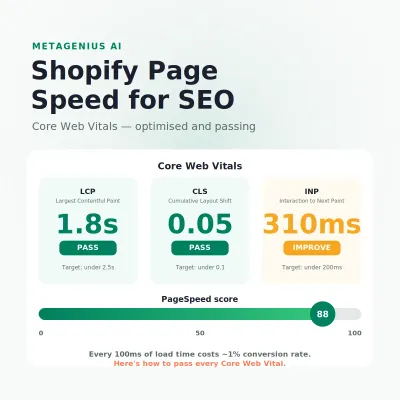
If you searched "Shopify PageSpeed" after seeing an orange or red score, start here: a slow Shopify store loses you twice. The Google-commissioned [Milliseconds Make Millions](https://web.dev/case-studies/milliseconds-make-millions) study by Deloitte found a 0.1 second improvement in mobile site speed increased conversion rates by 8.4% for retail sites. And Google's [page experience documentation](https://developers.google.com/search/docs/appearance/page-experience) confirms Core Web Vitals are used by its ranking systems.
You are not choosing between speed for users and speed for search engines. They are the same thing.
The good news is that Shopify's infrastructure (its global CDN, automatic image format selection and modern transport protocols) gives you a head start. Most **Shopify page speed** problems are not platform problems. They are problems you introduce: oversized images, apps injecting JavaScript on pages that do not need it, web fonts without resource hints, and third-party widgets that block rendering. This guide covers exactly where to look and what to fix.
## Shopify PageSpeed and SEO: The Direct Connection
Google's [page experience guidance](https://developers.google.com/search/docs/appearance/page-experience) says two things that matter here. Core Web Vitals are used by its ranking systems, and Google Search "always seeks to show the most relevant content, even if the page experience is sub-par". A fast page does not outrank a slow page with much better content. In competitive queries where relevance is roughly equal, Core Web Vitals are a tiebreaker, and a meaningful one.
The more commercially significant effect is indirect. Faster pages earn more time on site, fewer abandoned sessions and more return visits. Those are the behaviours that produce revenue whether or not Google weighs them.
### The conversion-ranking feedback loop
Here is why speed investment pays double. Faster load times raise conversion rate, which raises revenue per session without extra ad spend. Say a store does $100K a month at a 2% conversion rate. If a faster product template lifts that to 2.1%, a 5% relative gain, that is $5K a month at the same traffic.
The 8.4% retail figure from the [Deloitte study](https://web.dev/case-studies/milliseconds-make-millions) came from a 0.1 second improvement across the whole journey on mobile, which is a smaller change than most Shopify stores have available. The ranking benefit comes after, and more slowly, as field data catches up.
## Shopify Core Web Vitals Explained
Google measures page experience with three Core Web Vitals. Each has a threshold separating "Good", "Needs improvement" and "Poor", and the thresholds below come from Google's own [Web Vitals documentation](https://web.dev/articles/vitals). Each metric has different fixes, so knowing which one you fail is the whole diagnosis.
| Metric | What it measures | Good | Needs improvement | Poor |
| --- | --- | --- | --- | --- |
| LCPLargest Contentful Paint | How fast the main visible content loads | ≤ 2.5s | 2.5–4.0s | > 4.0s |
| INPInteraction to Next Paint | How fast the page responds to taps and clicks | ≤ 200ms | 200–500ms | > 500ms |
| CLSCumulative Layout Shift | Visual stability (elements jumping around) | ≤ 0.1 | 0.1–0.25 | > 0.25 |
Google assesses each metric at the [75th percentile of page loads](https://web.dev/articles/vitals), segmented across mobile and desktop. So a page passes when three out of four real visits hit the target, not when your own laptop on office wifi does.
### What typically fails on Shopify stores
**LCP** is most often failed by large, unoptimised hero images or product photos that are not preloaded. The LCP element on a product page is almost always the main product image. If that image is a multi-megabyte PNG rendered without a width, your LCP will be poor on mobile connections regardless of everything else.
**INP** [replaced First Input Delay on 12 March 2024](https://web.dev/blog/inp-cwv-march-12). It measures the full interaction, from the tap to the next visual update, not just the delay before the page starts responding. Shopify stores fail INP because of heavy app JavaScript, particularly scripts that register global event listeners or run on every page whether or not their feature is used.
**CLS** is usually caused by images without width and height attributes (the browser cannot reserve space), banners that load late and push content down, or web fonts that reflow text when they finish loading. On Shopify, CLS problems often trace back to theme sections that load asynchronously or apps that inject bars without reserved space.
### Shopify Core Web Vitals optimisation: which fix for which metric
| Failing metric | Usual Shopify cause | Fix | Covered in |
| --- | --- | --- | --- |
| LCP | Hero or product image too large, not preloaded, lazy-loaded above the fold | Render with image_url at the displayed width, preload the first image, never lazy-load the LCP image | Fix 1: Images |
| LCP | Render-blocking app or theme scripts in the head | Defer or remove; load fonts with font-display: swap | Fix 3 and Fix 4 |
| INP | App JavaScript running on every page, pixels on the main thread | Uninstall unused apps, remove leftover script tags, fire pixels through a tag manager only where needed | Fix 2: App bloat |
| CLS | Images without dimensions, late banners, font swap | Add width and height, reserve space for announcement bars, preload the primary font | Fix 1 and Fix 4 |
If you prefer to watch the fixes, the Chrome team walks through all three metrics in this talk.
[ YouTube · Chrome for Developers**Optimize for Core Web Vitals**Watch on YouTube](https://www.youtube.com/watch?v=AQqFZ5t8uNc)
## How to Read Your Shopify PageSpeed Report
Before fixing anything, measure accurately. Three readouts matter: PageSpeed Insights, Search Console's Core Web Vitals report, and the web performance dashboard inside your Shopify admin. They show the same store from different angles.
### PageSpeed Insights
Go to [pagespeed.web.dev](https://pagespeed.web.dev/) and test your homepage, your best-selling product page and your busiest collection page. Test each separately, because scores vary by template on Shopify. A fast homepage can coexist with a slow product page, and the product page is where most of your organic traffic lands.
Read the report top down. The box at the top, "Core Web Vitals Assessment", is field data from real Chrome users and is what Google's ranking systems use. The score below it is lab data: Google's [PageSpeed Insights documentation](https://developers.google.com/speed/docs/insights/v5/about) describes it as a simulated load on a single device with fixed network conditions. Focus on the **mobile** tab, since that is how most shoppers arrive.
### Google Search Console Core Web Vitals report
In Search Console, open **Experience, then Core Web Vitals**. This groups your URLs by template and shows which ones fail which metric, using the same field data. It is the fastest way to see that, say, every product URL fails LCP while collections pass. The [Shopify SEO checklist](https://metagenius-ai-seo.com/blog/shopify-seo-checklist-for-2026-the-senior-operators-playbook/) puts this report in the monthly routine alongside indexing checks.
### Shopify's own web performance dashboard
Your Shopify admin also has a [web performance summary](https://help.shopify.com/en/manual/online-store/web-performance) that measures loading speed, interactivity and visual stability, the same three dimensions as Core Web Vitals. Shopify's note on that page is blunt: every feature you add (theme code, apps, images, videos, carousels, social feeds, analytics) can affect performance.
### What MetaGenius AI's Speed Report does (and does not do)
MetaGenius AI includes a Storefront Speed Report on every plan. It pulls your PageSpeed Insights and Core Web Vitals readout into the app, next to your SEO health score, so you can see what slows your pages down without leaving the admin. That is all it does.
It does not compress images, defer scripts or edit your theme, and we would be suspicious of any SEO app that claims to. The fixes below are yours to make.
### Chrome DevTools Network tab
To find specific culprits, open Chrome DevTools on a product page, go to the Network tab, throttle to "Fast 3G" and reload. Sort by size, descending. The largest requests are where to start: image files, blocking scripts and unused CSS.
## Fix 1: Image Optimisation (Biggest Win)
Images are the largest contributor to page weight on Shopify stores. A product page with several product photos, lifestyle images and review screenshots can add megabytes of image data when each file is served at upload size. Fixing this alone is usually the biggest single LCP improvement available.
### Use Shopify's built-in image transformation
Shopify's CDN transforms images on request. In your theme's Liquid, always render images at the displayed size with the [`image_url` filter](https://shopify.dev/docs/api/liquid/filters/image_url) and an explicit width: `{{ product.featured_image | image_url: width: 800 }}`. Shopify documents a maximum width of 5760px, which tells you how large an untransformed image can be. Serving a 4000px image into a 400px slot is a common theme mistake.
### Let Shopify pick the format
The same [`image_url` documentation](https://shopify.dev/docs/api/liquid/filters/image_url) states that Shopify automatically detects which image formats the client supports and selects a file format for optimal quality and size, WebP and AVIF included. Google's [WebP documentation](https://developers.google.com/speed/webp) puts lossy WebP at 25–34% smaller than comparable JPEGs. You get that for free as long as the image goes through the filter. Older themes with hard-coded image URLs, and app-supplied image blocks, bypass it: check the Network tab for `image/webp` or `image/avif` on product images.
### Add explicit width and height
Every product image in your theme should carry `width` and `height` attributes. This is the primary CLS fix: without them, the browser reserves no space and the layout shifts when the image arrives. In Liquid: ``.
### Preload the LCP image
The main product image is almost always the LCP element. A preload hint tells the browser to fetch it immediately rather than when the parser reaches it. In `theme.liquid`, inside `` on product templates: ``. And never lazy-load that first image; lazy loading belongs on the images below the fold.
### Upload sensibly
Shopify's [image upload guidance](https://help.shopify.com/en/manual/online-store/images/theme-images) allows files up to 20 MB and 20 megapixels, and states that images are not compressed when you upload them to the admin. Transformation happens when the theme renders them. So an uploaded 20 MB original is fine as the source, but only if your theme requests a sized version. If it requests the original, that is your LCP problem.
### Image alt text: the SEO multiplier
Fast images with no alt text miss the other half of image SEO. Alt text is what lets product photos surface in Google Images, and it is required for accessibility. Our post on [how alt text affects image search rankings](https://metagenius-ai-seo.com/blog/alt-text-image-search-rankings/) explains the mechanism, and the free [alt text checker](https://metagenius-ai-seo.com/tools/alt-text-checker/) shows how many images on a page are missing it.
For stores with hundreds of product images, writing alt text by hand is impractical. MetaGenius AI writes alt text for every product image in bulk, from the product data and the image, at 1 credit per image; see [how to bulk add alt text to Shopify images](https://metagenius-ai-seo.com/blog/bulk-alt-text-shopify/) for the full process.
## Fix 2: App and Script Bloat
Every Shopify app you install can inject JavaScript, CSS or tracking code into every page of your store, whether that page uses the app or not. Twenty apps, each adding its own script, means a lot of code downloaded and parsed before the page becomes interactive, and that is the usual INP failure.
### Audit your app scripts
In Chrome DevTools, open the Coverage tab (Ctrl+Shift+P, type "coverage"). Load a product page and see how much JavaScript was downloaded but never executed. Red bars are unused code.
A common finding is that much of the JavaScript on a product page comes from apps that do nothing on that template: a chat widget on every page, a size guide on collection pages, a subscription app on products with no subscriptions. Each one is a candidate for removal or conditional loading.
### Remove or uninstall unused apps
An uninstalled app does not always remove its script tags from your theme. After uninstalling, check `theme.liquid` and your product and collection templates for leftover `